 Josh Creek
Project Name
AutomatedAssessmentFeedbackAgent
Description
AI-Powered Automated Assessment and Feedback Agent

An intelligent, agentic AI system built by a teacher-turned-engineer to deliver instant grading, personalized feedback, and real-time transparent reasoning - saving teachers hours and improving student outcomes.
🏆 Hackathon Info
Built for the Microsoft Hack Together: AI Agents Hackathon (April 8–30, 2025).
Status: Hackathon prototype/MVP.
See the Official Rules.
Created using:
- JavaScript/TypeScript
- Azure AI Agent Service
📽️ Demonstration and Hackathon Experience Video
✨ Live Demos / Key Functionality
Key Features:
- Instant, AI-powered grading and feedback
- Human-in-the-Loop escalation for ambiguous cases
- Real-time agentic tool use and transparent reasoning
- Assessment history stored locally for privacy
- Fully tested and CI-backed for reliability
Below are GIF demonstrations of the Automated Assessment Feedback Agent in action, showcasing core features and real-world scenarios:
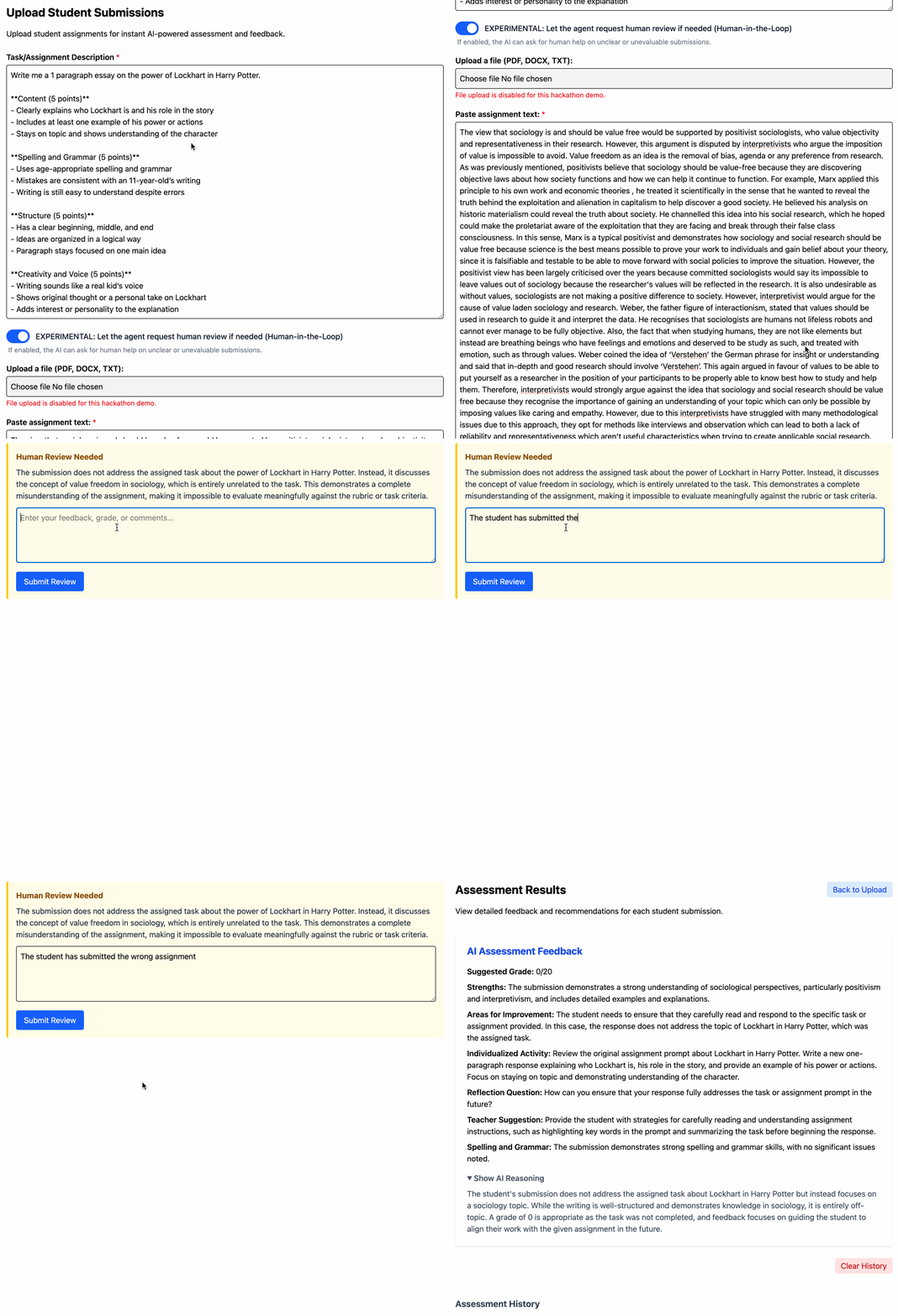
1. Human-in-the-Loop (HITL): Wrong Assignment Provided
The agent detects when a student submits the wrong assignment and facilitates teacher intervention.
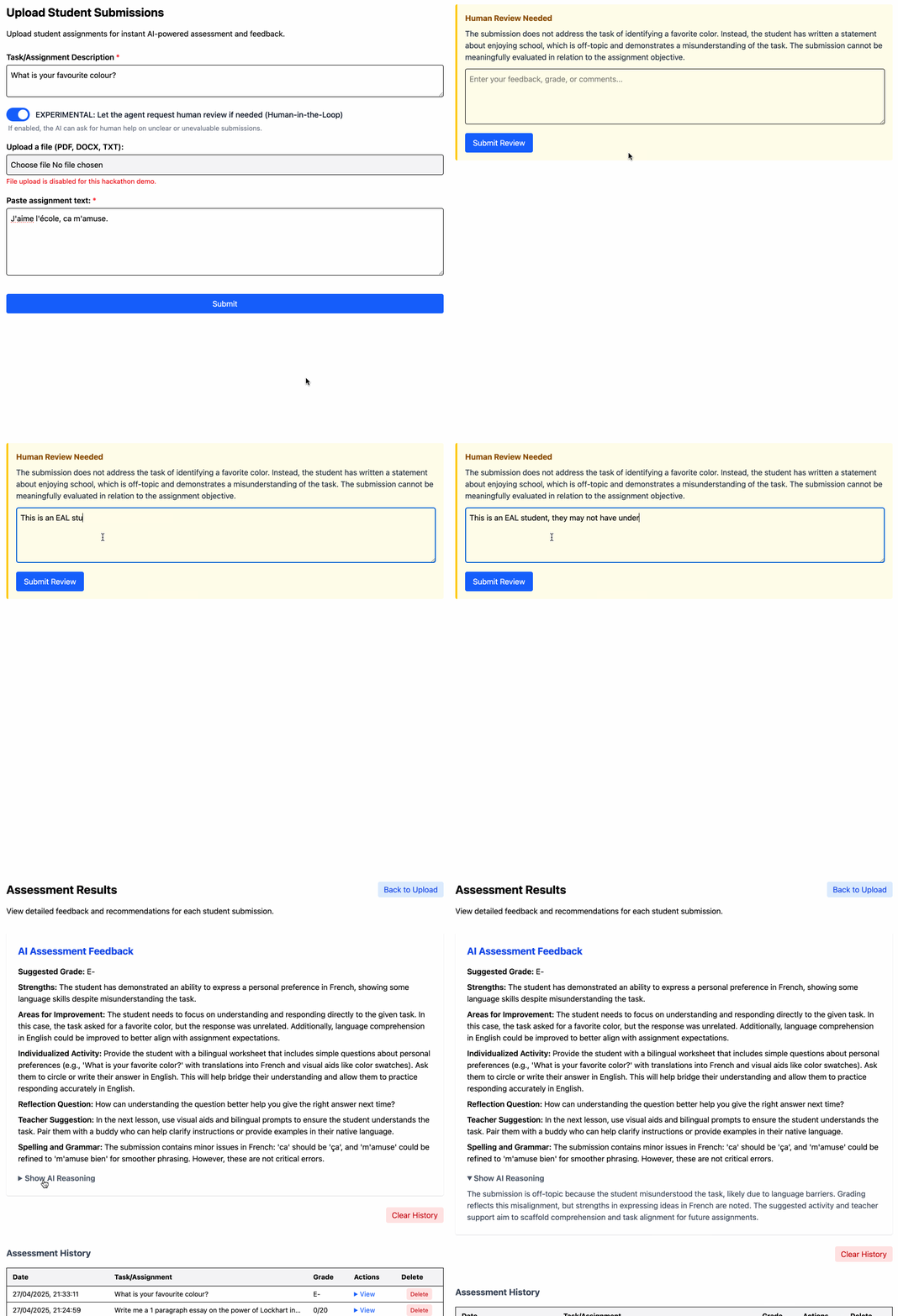
2. HITL: English as an Additional Language (EAL) Student
Demonstrates tailored feedback and HITL support for a student with EAL needs.
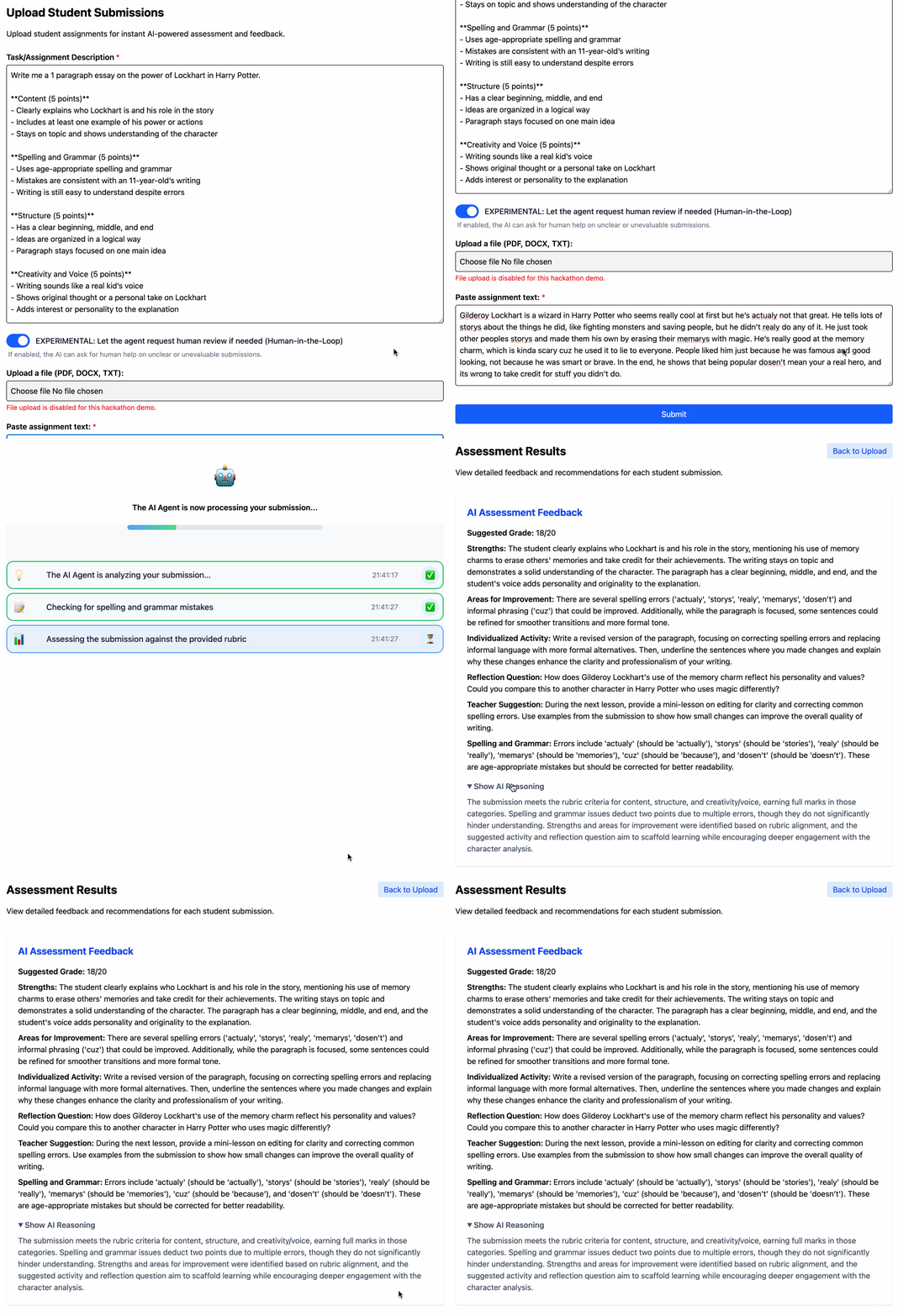
3. Assessing a Wordy Essay-Type Task
Shows the agent analyzing and providing feedback on a complex, open-ended essay response.
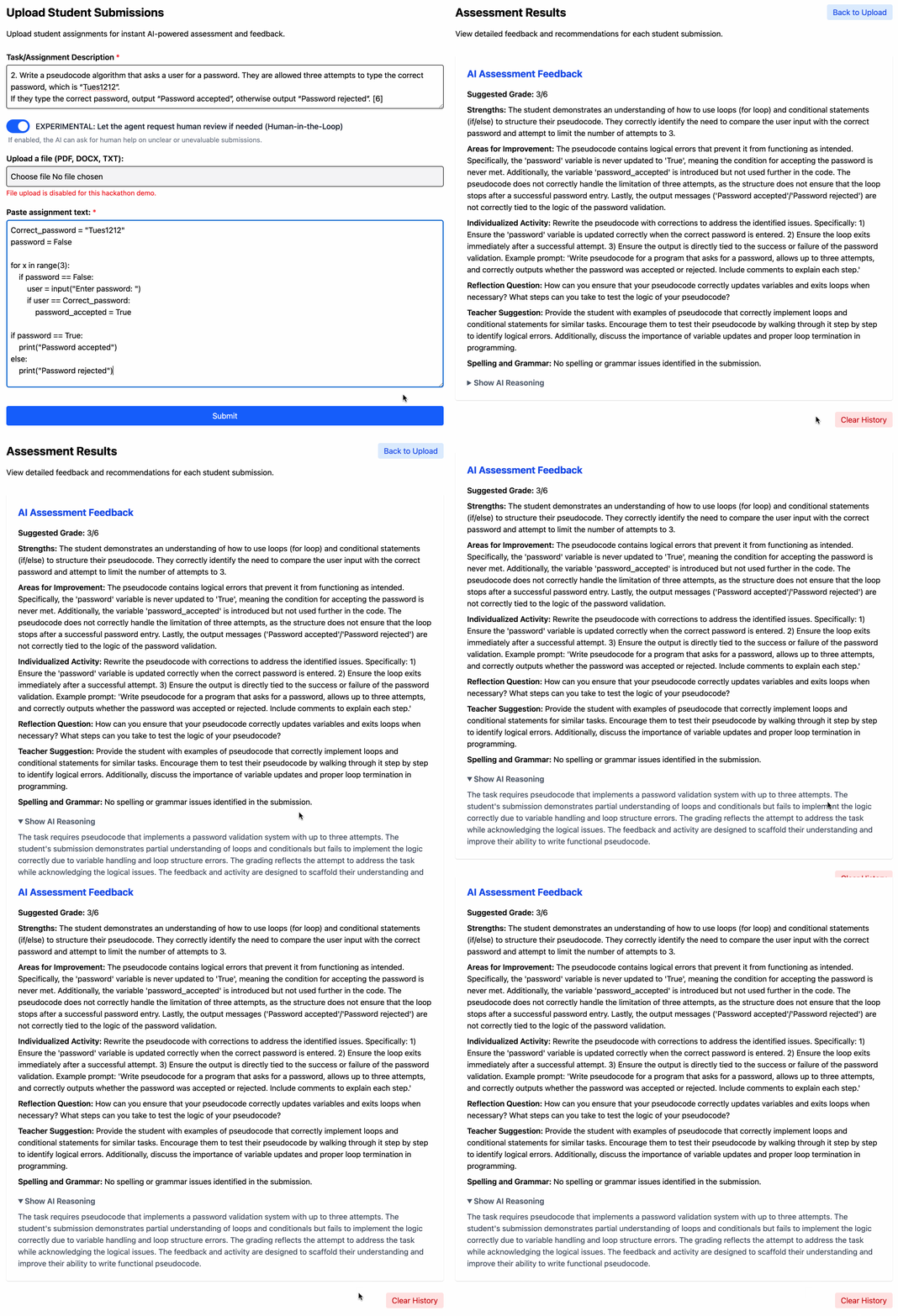
4. Assessing a Computer Science Coding Task
The agent evaluates a programming submission, running code tests and generating feedback.
📁 Table of Contents
- Project Overview
- Team Information
- What Makes This Unique
- Who Is This For?
- How It Works
- Technical Details
- Automated Testing & Quality Assurance
- Human-in-the-Loop Innovation
- Accessibility and Responsible AI
- Security & Privacy
- Setup, Usage, and Testing
- License
1. Project Overview
Elevator Pitch
An agentic AI system for teachers that transforms grading and feedback.
Transparent, real-time tool use and reasoning builds trust—giving educators instant, individualized assessments and actionable feedback for students that teachers can understand, edit, and trust.
2. Team Information
Created and built entirely by me, Josh Creek - an ex-teacher and current software engineer.
Mission: build AI tools that genuinely empower educators, save time, and improve student outcomes.
3. What Makes This Unique
Why is this different from other AI grading tools?
- Real-Time Transparency: Teachers see every reasoning step and tool the agent chooses—live.
- Personalized Feedback: Detailed, contextual feedback plus strengths, improvements, follow-on activities, and suggestions.
- Human-in-the-Loop Escalation: The agent escalates edge cases to the teacher for review (never guessing blindly).
- Resilient History Management: All assessments stored locally for review, even during demos (no student data stored anywhere but the teacher's browser).
- Accessibility First: Full screen reader support, keyboard navigation, color contrast compliance.
- Robust Error Handling: Friendly, actionable error messages for upload, AI, or network issues.
- Real-Time Agentic Progress Visualization: Not just a loading spinner—teachers see, in real time, which tools and reasoning steps the agent chooses as it grades. This transparency builds trust and helps educators understand how AI arrives at its conclusions.
- Built by a Teacher, for Teachers: Practical, realistic, classroom-aware design.
4. Who Is This For?
Audience
- Teachers seeking to save time, improve feedback quality, and maintain control.
- Schools/Educational Institutions aiming to modernize and streamline assessment workflows.
Educational Impact
- Reduces hours spent grading and marking.
- Improves quality and consistency of student feedback.
- Allows teachers more time to focus on direct student interaction and lesson planning.
5. How It Works
Workflow At A Glance
- Upload assignment instructions and student response (text for demo; file support planned).
- Agent generates real-time, transparent reasoning and instant grading.
- If the agent thinks it needs it, it can optionally ask the teacher for suppport (Human-In-The-Loop).
- Teacher reviews, edits, or clears assessments from local history.
Demo it!
Upload a meaningful text (or minimal/off-topic text to trigger Human-in-the-Loop escalation).
Watch live tool use and reasoning.
Review or clear past assessments directly in history.
System Flow Diagram (with HITL)
This shows how a user interacts with the system and how requests are processed, including HITL.
flowchart TD
    Teacher["Teacher (User)"]
    Upload["Upload Page"]
    Results["Results/History Page"]
    AgenticProgress["AgenticProgress Component"]
    LocalStorage["localStorage (Browser)"]
    APIGrade["API: /api/grade"]
    APIHITL["API: /api/hitl-review"]
    EventStream["PartyKit WebSocket (Real-time Agent Progress)"]
    OpenAI["Azure OpenAI (NLP, Grading, Feedback)"]

    %% Standard Grading Flow
    Teacher -->|Uploads assignment & student work| Upload
    Upload -->|Calls| APIGrade
    APIGrade -->|Sends to| OpenAI
    APIGrade -->|Streams progress| EventStream
    EventStream -->|Updates| AgenticProgress
    APIGrade -->|Returns feedback| Results
    Results -->|Saves| LocalStorage
    Results -->|Displays| Teacher

    %% HITL Escalation (Human-in-the-Loop Path)
    APIGrade -- Escalates if unclear/minimal --> TeacherReview["Teacher Review (HITL Prompt)"]
    TeacherReview -->|Submits review| APIHITL
    APIHITL -->|Injects teacher feedback| OpenAI
    APIHITL -->|Returns final feedback| Results
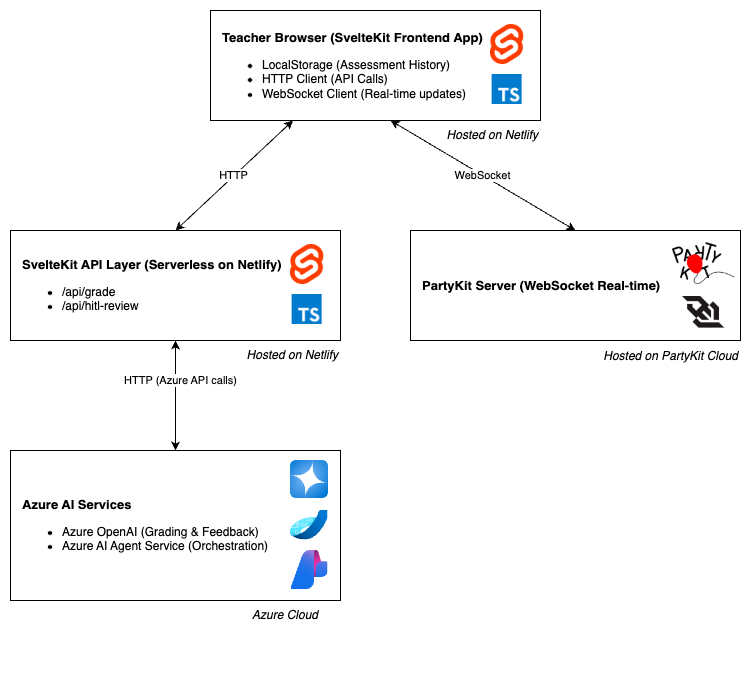
Architecture Diagram
This shows the big-picture technical structure and how my chosen technologies fit together.
The architecture includes:
- Frontend: SvelteKit app (browser)
- Connects to PartyKit (for real-time events)
- Calls API endpoints (/api/grade, /api/hitl-review)
- Saves assessment history in browser localStorage
- Backend: SvelteKit API routes (serverless functions, e.g., Netlify)
- /api/grade: Handles grading, talks to Azure OpenAI
- /api/hitl-review: Handles teacher review, resumes AI grading
- Third-Party Services:
- Azure OpenAI (AI grading, feedback)
- Azure AI Agent Service (agentic workflow orchestration, tool use, LLM integration)
- PartyKit (WebSocket server for real-time updates)
- Data Storage: Only in browser (localStorage), no backend DB
System architecture diagram showing component hosting, communication flows (HTTP, WebSocket), and external AI service integrations:
6. Technical Details
- Frontend: SvelteKit + TypeScript
- Real-time Events: PartyKit
- AI & Agent Orchestration: Azure AI Agent Service (agentic workflows, tool use) + Azure OpenAI (LLMs)
7. Automated Testing & Quality Assurance
This project is built with a strong focus on reliability and correctness:
- Comprehensive BDD Tests: All core features are covered by automated, scenario-based tests using Cucumber and Playwright.
- Continuous Integration: Every commit to the
mainbranch triggers a full test suite via GitHub Actions (see badge above), ensuring nothing breaks unexpectedly. - Real-World Scenarios: Tests simulate real teacher/student interactions.
- Easy to Run:
Or view the test scripts.
pnpm run test:bdd
Result: You can trust that this agent works—every time.
8. Human-in-the-Loop Innovation
How It Works
- If a student submission is minimal/ambiguous, the agent returns
HUMAN_REVIEW_REQUIREDand explains why. - Teacher intervenes, providing direct feedback.
- Agent resumes, using the human input to complete grading and feedback generation.
Why It Matters
- Transparency: Teachers always see why the agent requests help, with clear reasoning.
- Control: Teachers remain in the loop for edge cases, ensuring fairness and pedagogical soundness.
- Innovation: This collaborative workflow demonstrates how agentic AI can augment, not replace, expert educators—addressing a key hackathon challenge.
9. Accessibility and Responsible AI
Accessibility
- Screen reader and keyboard friendly.
- Color contrast meets WCAG AA standards.
- Accessible real-time agent progress updates.
- Tested with browser accessibility tools.
Responsible AI
I am committed to responsible and ethical use of AI in education. This project:
- Uses Azure OpenAI and Cognitive Services, which comply with Microsoft's responsible AI principles.
- Does not retain or share student data beyond local processing in the browser (history is stored in localStorage only).
- Clearly communicates to users when they are interacting with AI-generated feedback.
- Is designed to minimize bias by providing transparent, explainable feedback and allowing teachers to review/edit results.
- Does not use student data for model training or any secondary purpose.
10. Security & Privacy
- No Persistent Storage: All assessment history and student data are stored only in the user’s browser (localStorage). Nothing is ever uploaded to or retained on any backend server or database.
- Ephemeral AI Agent Threads: AI agent threads and any temporary data created during assessment are deleted immediately after grading is complete.
- No Data Sharing: Student data is never shared with third parties, used for model training, or processed for any purpose other than providing instant feedback.
- User Control: Users can review and clear their assessment history at any time from within the app.
- Secure Communication: All interactions with the Azure AI Agent Service are performed over secure, encrypted channels (HTTPS/WSS).
- Privacy by Design: The system is architected to maximize privacy and minimize data exposure at every step.
11. Setup, Usage, and Testing
Prerequisites
Running Locally
Once you've installed dependencies with pnpm install, start a development server:
pnpm run dev
# or start the server and open the app in a new browser tab
pnpm run dev -- --open
Building
To create a production version:
pnpm run build
You can preview the production build with npm run preview.
PartyKit Setup for Real-Time Events
This project includes end-to-end BDD (Behavior-Driven Development) tests using Cucumber.js and Playwright.
Prerequisites
Install Playwright Browsers
If you haven't already, install Playwright's required browsers:
pnpm exec playwright install
Running the Tests
- Start the SvelteKit dev server:
(Or use
pnpm run devpnpm run bdd:fullto auto-start the server and run tests.) - In a separate terminal, run the BDD tests:
This will execute all feature files in
pnpm run test:bddtests/bdd/features/using step definitions intests/bdd/steps/.
Test Output & Screenshots
- Test results will be shown in the terminal.
- On failure, a screenshot will be saved to the
screenshots/directory in the project root (seetests/bdd/support/hooks.ts). - Screenshot filenames are based on the scenario name.
Customizing/Debugging
- You can run a specific feature file:
pnpm run test:bdd -- tests/bdd/features/assessment_submission.feature - For more verbose output, add
--format progressor--format summary.
Project Scripts
pnpm run test:bdd– Run all BDD testspnpm run bdd:full– Start dev server and run all BDD tests (requires start-server-and-test)
For more information, see the package.json scripts section.
12. License
Licensed under the Business Source License 1.1.
See LICENSE file for details.
13. Future Enhancements
- Integration with major Learning Management Systems (LMS) for streamlined workflow.
- Expansion of supported assignment types and subjects.
- Development of analytics dashboards for deeper insights into class performance.
- Image upload for handwritten work, especially for teachers of younger students.
Built with love for teachers.
Language & Framework
- Python
- C#
- Java
- JavaScript/TypeScript
- Microsoft Copilot Studio
- Microsoft 365 Agents SDK
- Azure AI Agent Service
Project Repository URL
https://github.com/jcreek/AutomatedAssessmentFeedbackAgent
Deployed Endpoint URL
No response
Project Video
https://www.youtube.com/watch?v=FAi9-s9WP84
Team Members
jcreek
Registration Check
- Each of my team members has filled out the registration form